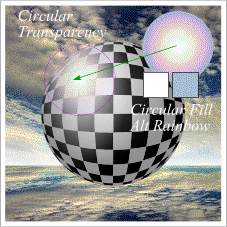
 A "lens flare" highlight will give the sphere a glossy look. Draw a .75 inch (3/4) circle and apply a pale blue fill. (Modify Sky Blue in the Color Editor). Change the Fill Type to Circular and the Fill Effect to Alt Rainbow. Position the circle over the highlight on the sphere and click the Transparency Tool and apply a Circular Transparency.
Page: 1 | 2 | 3 | 4 | 5 | 6 | 7 | 8 | 9 | 10 | 11 | 12 | 13 | 14 |