
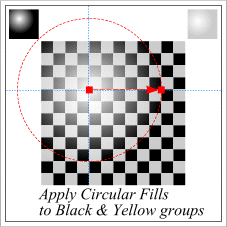
 Select the Black checks. Click the Fill Tool icon and from the Fill Type drop-down list on the Property Bar, select Circular Fill. Drag the center of the fill up and left as shown. Select the yellow checks and apply a 20% Black fill. Click the Fill Tool icon and change the Fill Type to Circular Fill. Drag the center of the fill to the same position as the Black fill. Matching the Circular Fills creates a the impression of a single checkerboard.
Page: 1 | 2 | 3 | 4 | 5 | 6 | 7 | 8 | 9 | 10 | 11 | 12 | 13 | 14 |