
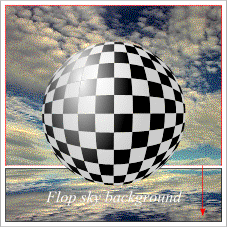
 Now let's put our sphere into orbit. With the Xara CD ROM in your CD ROM drive, open the Fill Gallery. (It's the paint can icon on the far right of the Property Bar.) Starting from the top guideline, Draw a rectangle 2.25 inches wide by about 1.7 inches tall. With the rectangle selected, open the Patterns Folder in the Fill Gallery and select the Sky fill and click the Fill button to apply the fill. (You can resize the fill by clicking on the Fill Tool, then dragging the resizing handles.) Select the sky background, drag the top center control handle down and past the bottom of the rectangle to the bottom guideline. Before releasing the left mouse button, click the right mouse button to drop a flopped duplicate. Cool, huh? Finally, drag the bottom of the upper rectangle about 1/8 inch farther down by dragging the bottom center control handle. Send the smaller rectangle to the back (Ctrl-B).
Page: 1 | 2 | 3 | 4 | 5 | 6 | 7 | 8 | 9 | 10 | 11 | 12 | 13 | 14 |