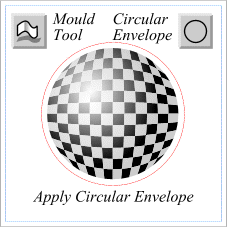
 Group the Black and White checkerboards. For reference, draw a 1.5 inch circle (shown in red) centered over the checkerboard. Select the checkerboard group, click the Mould Tool icon, then click the Circular Envelope icon on the Property Bar. Notice how the matched circular fills add to the illusion of roundness. The Circular Envelope does an OK job distorting the checkerboard, but the checks on the outside need more distortion to be believable.
Page: 1 | 2 | 3 | 4 | 5 | 6 | 7 | 8 | 9 | 10 | 11 | 12 | 13 | 14 |