
Step-By-Step
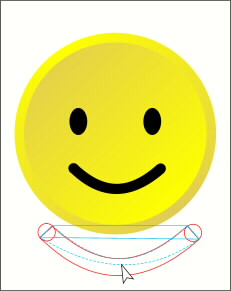
 Smiley Mom has two ellipses for eyes and a friendly curve for a mouth. You can make her mouth with a single 8 point line with the Round Cap option selected in the Line Gallery menu. Or, draw two circles and then use the Pen Tool to draw a 4-sided shape as shown here on top in blue. Use the Shape Editor Tool to drag down the lines to form the smile. Select all three shapes and Combine Shapes, Add Shapes to create a single outline.
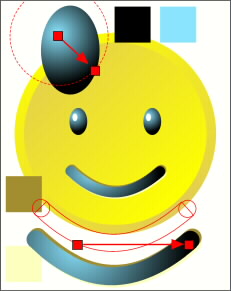 Apply a circular fill to the ellipse eyeballs using black and pale blue. Drag the center of the fill up and left. Add a smaller white ellipse for a highlight. Copy the eyeball shape (Ctrl C) and then select the mouth and Paste Attributes (Edit menu). Position the fill center as shown here. Make two duplicates of the smile, one dark yellow and one very pale yellow. Position the dark duplicate up a bit and the pale yellow copy down a bit. Bring the original to the top.
 PAGE BACK
HOME
NEXT PAGE TALK ROOM
EXIT TO CORELNET
PAGE BACK
HOME
NEXT PAGE TALK ROOM
EXIT TO CORELNET