
Step-By-Step
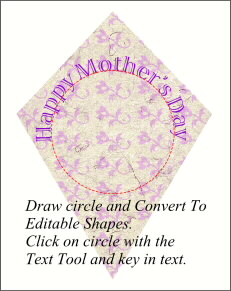
 Group all the pattern objects. Make a Duplicate kite shape and bring it to the front. Select the duplicate kite shape and the pattern group and from the Arrange menu select Combine Shapes, Intersect Shapes. This will neatly trim away the excess pattern. Draw a circle and Convert To Editable Shapes (Arrange Menu). Click on the circle with the Text Tool and key in Happy Mother’s Day. When you’re happy with the size and spacing, Convert To Editable Shapes. Rotate the circle and text until it is upright. Ungroup, and delete the circle.
 PAGE BACK
HOME
NEXT PAGE TALK ROOM
EXIT TO CORELNET
PAGE BACK
HOME
NEXT PAGE TALK ROOM
EXIT TO CORELNET