
-
Step-By-Step Continued
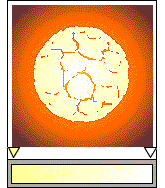 Center the sphere over the background. Make sure all of the pieces are Combined (Ctrl L). Apply a Radial Fountain fill going from pale yellow to white. This is the molten core.
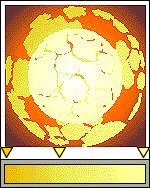 Create a duplicate of the core. Break it apart (Ctrl K), separate the elements and remove a few to create more distance. Re-Combine the elements. enlarge them and apply a Custom Radial Fountain fill as shown. Rotate about 60 degrees. Select the molten core and bring it to the front (Shift Pg Up).
 PAGE BACK
HOME
NEXT PAGE TALK ROOM
EXIT TO CORELNET
PAGE BACK
HOME
NEXT PAGE TALK ROOM
EXIT TO CORELNET