
Step-By-Step (Continued)
 The sphere is placed inside a rectangle. The rectangle is given a Sky 3 Colors Texture Fill.
 Another rectangle is constructed, Aligned Bottom, Center with the large rectangle. Perspective is applied to the smaller rectangle and the top corners dragged toward the middle. This rectangle is given the same Sky 3-Colors Texture Fill with a Brightness setting of 20% to give the appearance of a mirrored surface.
To create the reflected sphere, the three elements of the sphere are selected, the middle top bounding box handle selected, and dragged down and below the bottom of the sphere. With the left mouse button still engaged, the right mouse button is clicked to drop a duplicate.
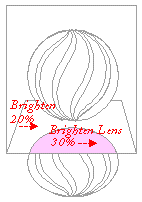 A copy of the reflected sphere is trimmed (shown in pink) and given a Brightness Lens of 30%. All elements, except the large rectangle, are selected and PowerClipped inside the large rectangle.
 PAGE BACK
HOME
NEXT PAGE TALK ROOM
EXIT TO CORELNET
PAGE BACK
HOME
NEXT PAGE TALK ROOM
EXIT TO CORELNET