
-
Step-By-Step
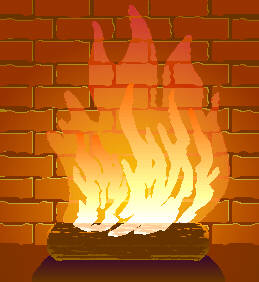
 Whoa...hold the phone, how did we get to this point? I've made a few modifications since the last page. I created a duplicate Group of bricks which I filled with lighter values, sent behind the original bricks and offset them up and right 1 point creating a highlight edge. I made a Copy of the original Group of bricks and placed it in the Clipboard (Ctrl C). I selected the two Groups of bricks and PowerClipped (Effects, PowerClip...Place Inside Container) them inside the background rectangle. And I placed a shadow in front of the log.
I Pasted a copy of the bricks (Ctrl P) from the clipboard and modified the fill to make it brighter. I PowerClipped these bricks inside of the big flame. The pattern of the bricks matches exactly creating a cool transparent effect. I drew a rectangle tangent to the top of the log and used it to create Intersections (Arrange-Intersection) for the bottom portion of the smaller flames. I Fountain Filled the Intersections with a slightly darker fill than the bottom of the flames and PowerClipped some lighter shapes inside to replicate the bark texture on the log. But wait, we’re just getting hot!
 PAGE BACK
HOME
NEXT PAGE TALK ROOM
EXIT TO CORELNET
PAGE BACK
HOME
NEXT PAGE TALK ROOM
EXIT TO CORELNET