CorelNet The Salon Page 8

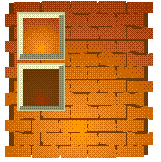 Position the brinks in front of the background and with the bricks still selected, from the Edit menu click on Copy Properties From. Select Fill and then click on the original background rectangle. Your bricks should now be about the same color as the rectangle. Select the rectangle and make each of the colors in the Radial Fountain Fill darker as shown in the second Fill Preview square. The background rectangle's fill will now be in sync with the bricks.
 PAGE BACK
HOME
NEXT PAGE
PAGE BACK
HOME
NEXT PAGE
TALK ROOM
EXIT TO CORELNET