
Step-By-Step
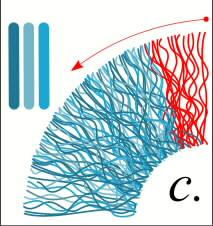
 The iris is actually filled with thousands of fine fibers. To simulate this, a series of wavy lines are drawn within a 30° wedge with the Freehand Tool with the Smoothness Setting set to 20%. This produces a smooth curved line. The fibers (shown in red) are colored with three colors (shown on left). The wedge is grouped, (Arrange-Group) duplicated, (Edit-Duplicate) and rotated around the iris. Double click on the wedge, drag the rotation bullseye to the center of the iris, then hold down the Ctrl key and drag the wedge 30 degrees. Repeat this step until the iris is covered.
 PAGE BACK
HOME
NEXT PAGE TALK ROOM
EXIT TO CORELNET
PAGE BACK
HOME
NEXT PAGE TALK ROOM
EXIT TO CORELNET