
Step-By-Step
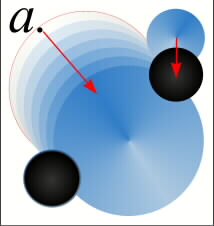
 The iris is filled with a Conical Fill. To add a soft edge to the iris, a slightly larger circle is filled with the same fill as the white of the eyeball. TIP: To Copy attributes in Xara, Copy (Edit-Copy) the object to be copied from, select the target object, then from the Edit menu, select Paste Attributes. The two circles are Blended. (the circles have been separated to show the blend steps). The pupil is filled with a Circular Fill from black to 80% black in the center. The fill from the iris is copied to a second, slightly larger circle, and Blended with the pupil adding a soft, realistic look that you would see if the iris were greatly magnified.
 PAGE BACK
HOME
NEXT PAGE TALK ROOM
EXIT TO CORELNET
PAGE BACK
HOME
NEXT PAGE TALK ROOM
EXIT TO CORELNET