
Step-By-Step
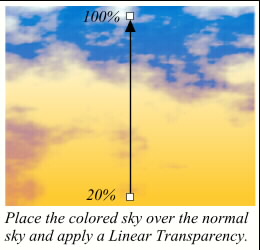
 Place the orange and pink sky in front of the normal sky and apply a Linear Transparency as shown here. This adds an appropriate touch of Mom’s Day magic to the sky.
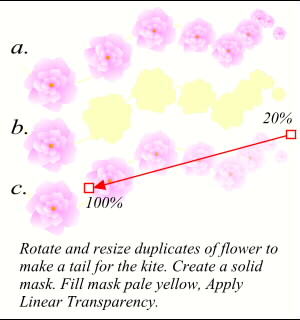 The final step is to add a tail to the kite to stabilize it. Make and rotate a series of flowers for the tail as shown in the top row. (a.) Place a copy of all but the first flower in the clipboard (Ctrl C). Select all but the first flower and Arrange-Ungroup and then Combine Shapes, Add Shapes. This creates a mask. Fill the mask pale yellow. (b.) Paste the flowers back onto the page using Ctrl Shift V (press all three at the same time) to paste them in exactly the same place, then send them to the back (Ctrl B). Apply a Linear Transparency to the mask as shown. (c.) This gives the flower tail the effect of fading away. Group all the tail elements.
 PAGE BACK
HOME
NEXT PAGE TALK ROOM
EXIT TO CORELNET
PAGE BACK
HOME
NEXT PAGE TALK ROOM
EXIT TO CORELNET