CorelNet The May 97 Salon Page 10

Step-By-Step
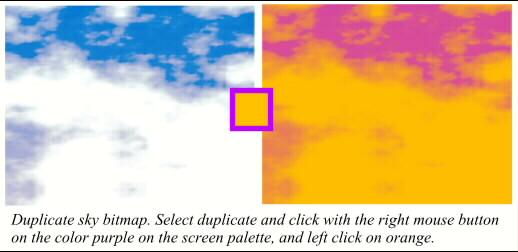
I created a sky image with clouds. Don’t ask, it's a tutorial in itself! You can use my favorite sky in the Fill Gallery, Patterns folder, Sky. Now here’s the groovy (does anybody say groovy anymore?) part. Make a duplicate sky. Convert the duplicate sky to a bitmap (Arrange--Create Bitmap Copy). With the duplicate bitmap selected click on the orange color on the screen palette with the left mouse button. Now click on the purple color with the right mouse button. Instant duo-tone. Neat trick, huh?
 PAGE BACK
HOME
NEXT PAGE
PAGE BACK
HOME
NEXT PAGE
TALK ROOM
EXIT TO CORELNET