
Step-By-Step
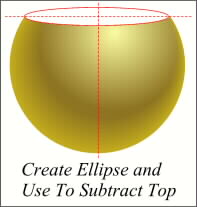
 Draw an ellipse about 1/4 down from the top. The sides of the ellipse should be just a hair wider that the sides of the sphere. Place a Copy of the ellipse in the Clipboard. (Ctrl C) Select the ellipse and the gold sphere and from Arrange menu select Combine Shapes, Slice Shapes. Delete the ellipse, re-select the gold sphere, and Arrange-Break Shapes. Delete the top portion.
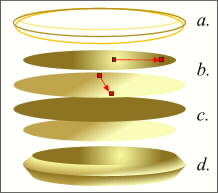 Paste a Copy of the ellipse. Make a wider version and a slightly deeper version. (a.) Fill the top ellipse with a gold Circular Fountain Fill. Give the larger ellipse a Linear Fountain gold fill. (b.) Make a Duplicate of the larger ellipse and fill it solid, deep ochre. Make a Duplicate of the top ellipse and copy the fill from the second ellipse down. (c.) You can copy attributes from one object (Edit-Copy Attributes) and then Paste the attributes to another object (Edit-Paste Attributes). Minimize the distance between ellipses and Blend the top two. Repeat this with the bottom two ellipses. Align the two blends as shown in d.
 PAGE BACK
HOME
NEXT PAGE TALK ROOM
EXIT TO CORELNET
PAGE BACK
HOME
NEXT PAGE TALK ROOM
EXIT TO CORELNET