
-
Step-By-Step
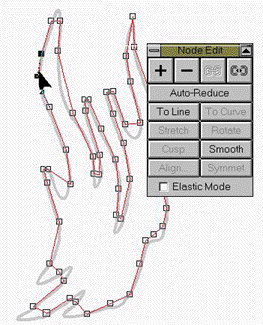
 You can use CorelTrace if you wish to create your outline, I prefer to use the bitmap as a template and draw over it. The process is not hard and produces better results than Trace.
 Before you start, click on the Freehand Tool fly out menu and select the Bezier Line Tool, (the second choice). With it you can draw a continuous path with a series of single clicks. Draw a rough outline clicking at the approximate begin and end points to each curve. When you’ve finished, marquee select (drag a box around) your drawing with the Shape Tool and double click on one of the nodes to open the Node Edit dialog box. Click on the To Curves option. Drag the rubber band-like line segments (not the nodes) with the Shape Tool to conform to the bitmap template. This technique is very effective for creating smooth outlines.
 PAGE BACK
HOME
NEXT PAGE TALK ROOM
EXIT TO CORELNET
PAGE BACK
HOME
NEXT PAGE TALK ROOM
EXIT TO CORELNET