
Step-By-Step
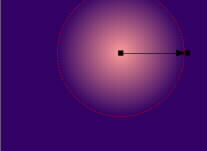
 To add drama to our stormy sky we’ll create a light and dark overlay. In a few moments we’ll add a little transparency to it. Create a rectangle the same size as the sky background. Give it a circular fountain fill from pale pink to a deep violet. The circle and arrow represent Xara’s controls for circular fountain fills. Pulling the small outside square expands the fill. You can drag colors from the on-screen palette to either end of the arrow.
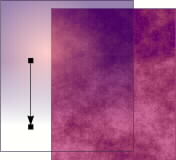 Place the fountain filled rectangle in front of the sky and apply a Linear Transparency-Mix. The arrow indicates the origin and direction of the fill. This adds a little depth to the angry sky.
 PAGE BACK
HOME
NEXT PAGE TALK ROOM
EXIT TO CORELNET
PAGE BACK
HOME
NEXT PAGE TALK ROOM
EXIT TO CORELNET